Trade management & automation for NinjaTrader 8
Plan the trade. BlackBird trades the plan.
Set your stops, targets and trailing rules before you enter. BlackBird carries them out on every trade, so your exits follow the plan, not your nerves. Daily safeguards can lock out new trades when you hit your max loss, so one bad trade doesn't turn into a bad day.
- Full version, in simulation
- BloodHound included
- No coding required
Since 2012 building for NinjaTrader
Thousands of paid traders
NinjaTraderEcosystem member
No code point-and-click setup
The gap between plan and execution
Your plan is clear before the entry. Then price starts moving.
Most traders know where their stop and targets belong. The hard part is sticking to it consistently, in real time, on every trade.
Managing it by hand
- Hesitating on the stop. You meant to move it to breakeven, but you waited one more bar.
- Giving back open profit. The trade ran, then reversed while you were deciding.
- Juggling contracts. Scaling out of three positions with three different exits, by clicking.
- One more trade. Down for the day and nothing to stop you.
With BlackBird
- Breakeven when you said. A Trailing Action moves the stop the moment your trigger is hit.
- Stops that follow the market. Trail by ticks, or by an indicator such as a moving average or Bollinger Band.
- Every contract has a job. Separate order sets for a quick target, a second target and a runner.
- Limits you set in advance. Daily loss limits and profit goals that can lock out new trades, manual or automated, plus schedules for automated trading.
How BlackBird works
Build the plan once. Use it on every trade.
Three layers you configure ahead of time. BlackBird applies them through NinjaTrader every time you enter.
Step 1 · Trade plan
Lay out the orders
Split a position into order sets, each with its own stop and target. Place them at fixed distances or at live indicator values.
| Set | Qty | Stop | Target |
|---|---|---|---|
| T1 | 1 | −10t | +12t |
| T2 | 1 | Lower BB | +24t |
| Runner | 1 | Lower BB | — |
Step 2 · Trailing Actions
Decide how orders move
Each rule says when to act, what to do and whether to repeat. Rules apply to stops, targets and even pending entries.
| Trigger on | Profit ≥ 8 ticks |
| Action | Move stop to entry + 2 |
| Repeat | Once |
Step 3 · Safeguards
Set your boundaries
Size positions from your risk, then cap each day with loss limits, high-water-mark protection and trading hours.
| Daily loss limit | −$500 |
| Give-back from peak | 40% |
| Auto entries | 08:45–11:30 |
See it before you click
Preview your stops and targets on the chart.
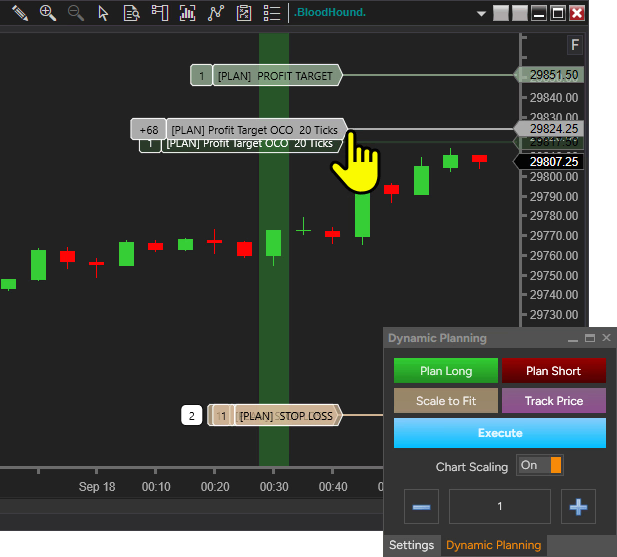
Dynamic Planning draws your trade plan at current market levels, so an indicator-based stop isn’t an abstract setting. You see exactly where each order will go and what the trade risks.
- Risk-based sizing. Contracts calculated from your stop distance and account rules.
- Risk/reward at a glance before you commit.
- Same plan, any entry. Manual clicks or automated signals.
Your style, your starting point
Where do your entries come from?
BlackBird manages the trade the same way, whether you click the button yourself or a signal does it for you. Start manual and automate later, or never.
Your click
Discretionary
You make the call. BlackBird manages the plan.
Enter when you see your setup. BlackBird submits the entry and handles stops, targets and trailing from there. No signal system needed.
BloodHound
Included in your trial
Turn your rules into signals, then automate them.
Build entry and exit conditions visually in BloodHound. BlackBird watches for the signal, enters, and manages the trade with the same plan.
Your indicator
Bring your own
Already have an indicator you trust?
If it outputs machine-readable long and short signals, BlackBird can trade from it. A drawing or chart marker alone isn’t enough; we’ll help you check.
TradingView
via SharkSignals
Signals from TradingView alerts or webhooks.
SharkSignals receives external alerts and routes them to NinjaTrader. Connect it to BlackBird for full trade management.

BloodHound · the “when” layer
Need help deciding when to trade?
BloodHound turns the checklist in your head into rules NinjaTrader can evaluate. Connect conditions like building blocks, see the signals on your chart, and refine until they match how you trade.
✓ Included in your 30-day trial
- Hundreds of conditions across built-in, custom and third-party indicators.
- Visual logic: AND, OR, lookbacks, blockers, multiple timeframes.
- Use it alone to highlight setups, or feed BlackBird to automate.
Your first 30 days
From download to your first managed trade.
You don’t need to learn every setting on day one. Short getting-started videos walk you through a practical first setup, all in simulation.
01
Start your trial
Sign up and download the installer. BlackBird and BloodHound install into NinjaTrader 8 on Windows.
02
Build your first bracket
Follow along to set a stop and two targets, then add a breakeven rule.
03
Trade it in simulation
Place a simulated trade and watch BlackBird manage it. Add trailing when you’re ready.
Free
04
Get a 1-on-1 setup call
Talk through your trading style with our team and get your plan configured.
From our traders
Built with traders since 2012.
There are so many useful features and options to employ. I should have purchased BlackBird a lot earlier. I had been using NT8’s ATM but not achieving the results I had planned.
Jacqui P.BlackBird & BloodHound user since 2022
BlackBird handles all of my pre-trade decisions and money management, allowing my second-guessing to remain on the sidelines.
@_RandwulfBloodHound & BlackBird user, via YouTube
There is a learning curve which should be expected on such a powerful tool, but you guys have handled it well with the videos and literature.
XavierBloodHound & BlackBird owner since 2018
Testimonials may not be representative of the experience of other customers and are not a guarantee of future performance or success.
You won’t be on your own
Documentation, training and people who answer.
SharkSignals · cloud platform
Trading from TradingView alerts?
SharkSignals, our cloud service, sends TradingView and webhook signals to NinjaTrader. Pair it with BlackBird for full trade management.
Before you start
Questions traders ask first.
Still unsure? Ask us anything. Real people answer.
What’s included in the free trial?
The full versions of BlackBird and BloodHound for 30 days, in simulation, plus the getting-started videos and a free setup call.
Do I need BloodHound to use BlackBird?
No. Many traders use BlackBird alone with manual entries. BloodHound is there if you want to define entry rules and automate them.
Do I need to know how to code?
No. Everything is configured with settings and visual editors. You still decide the rules: no-code doesn’t mean no thinking.
Does it run on a Mac or in a browser?
BlackBird and BloodHound run inside NinjaTrader 8 desktop, which requires Windows. Many of our Mac traders use our Trading VPS, a Windows server you connect to from your Mac. Others run Windows on their Mac with Parallels.
Can BlackBird stop me from overtrading?
Yes, for trades placed through BlackBird. Daily safeguards such as a max loss or profit goal can lock out new BlackBird trades, manual or automated, until you deliberately reset them.
Does BlackBird guarantee my stop gets filled?
No software can. BlackBird places and moves orders exactly as configured, but stops can still slip in fast markets, gaps or disconnections.
Put your trade plan to work on a simulated trade.
Full versions of BlackBird and BloodHound, free for 30 days.
NinjaTrader 8 · Windows